NEW · AppJuggler 2.0 for macOS
Jump straight to any app or window. From your keyboard.
AppJuggler gives each of your apps its own letter. Double-tap Caps Lock, press the letter, and you're there, even across Spaces and full-screen apps. Faster than ⌘Tab, the Dock or Mission Control, and it never gets in the way of your typing.
AppJuggler 2.0 is coming soon. Write to hello@puffyclouds.works to get notified.
Version 2.0 · macOS 13 or later · Apple Silicon & Intel · 14-day free trial · EULA
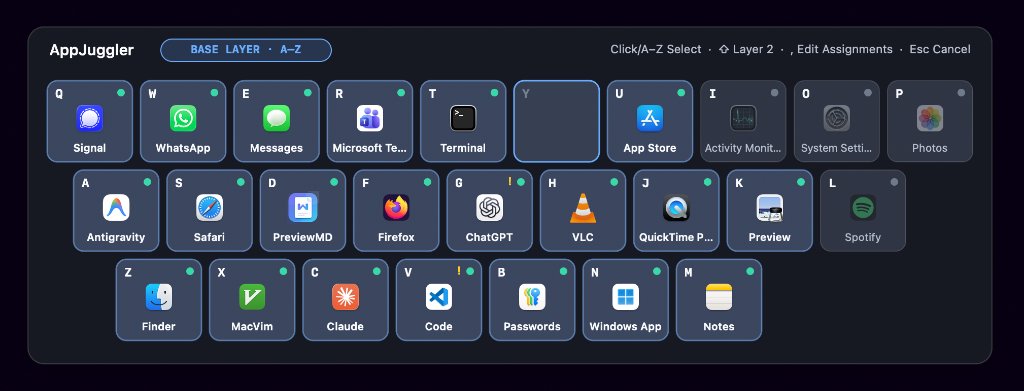
⌘Tab was built for 5 apps. You run 25.
⌘Tab shuffles.
The order changes every time you switch, so you have to look before you press.
The Dock is a mouse trip.
And Mission Control is a grid you have to scan.
Full-screen apps hide.
They live in their own Spaces, out of sight.
AppJuggler replaces hunting with muscle memory: one fixed letter per app, always in the same place.
How it works
Three keys. Every time.
01
Double-tap Caps Lock.
The keyboard-map overlay appears instantly. A single Caps Lock press still works normally, and AppJuggler puts your Caps Lock state and its light back exactly as they were.
02
Press the app's letter.
A–Z and ⇧A–Z give you 52 slots. Assignments are tied to the app itself, so they survive quitting the app and restarting your Mac.
03
Land on the right window.
One window: you're there. Several: press 1–9 (then A–Z for windows 10–35), or ↑ ↓ and Enter. App not running: AppJuggler launches it and brings it forward as soon as its window appears.
Type ahead. Never wait.
Fire off ⇪⇪ T 3 as fast as your fingers go. AppJuggler handles the keys immediately, on its own thread, and your keystrokes never leak into the app you land on.
Features
Everything is one keystroke away.
01
52 permanent slots, two layers.
Letters for your everyday apps, ⇧Shift plus a letter for the next 26. Hold Shift in the overlay to preview the second layer.
02
A keyboard map you'll stop needing.
The overlay shows your keyboard with each app's icon and name. Running apps get a dot, closed apps are dimmed, and it appears on the display your pointer is on.
03
Window numbers that stay put.
Each window keeps its number for the session; closing window 2 leaves window 3 as 3.
04
Direct Jump.
Press ~ before the letter (⇪⇪ ~ T) to go straight to the app's most recent window. Or switch the list off per app.
05
Works across Spaces and full-screen apps.
The overlay appears over full-screen apps.
Cross-Space jumps use macOS's standard Space animation.
06
Instant Maximize (0 ms).
Optional: the window you jump to fills the screen instantly, with no zoom animation. Or have it enter native Full Screen.
07
Turn off the wait.
The Disable Window Animations helper switches off macOS window, Dock and Mission Control animations in one click.
08
Set up in a minute.
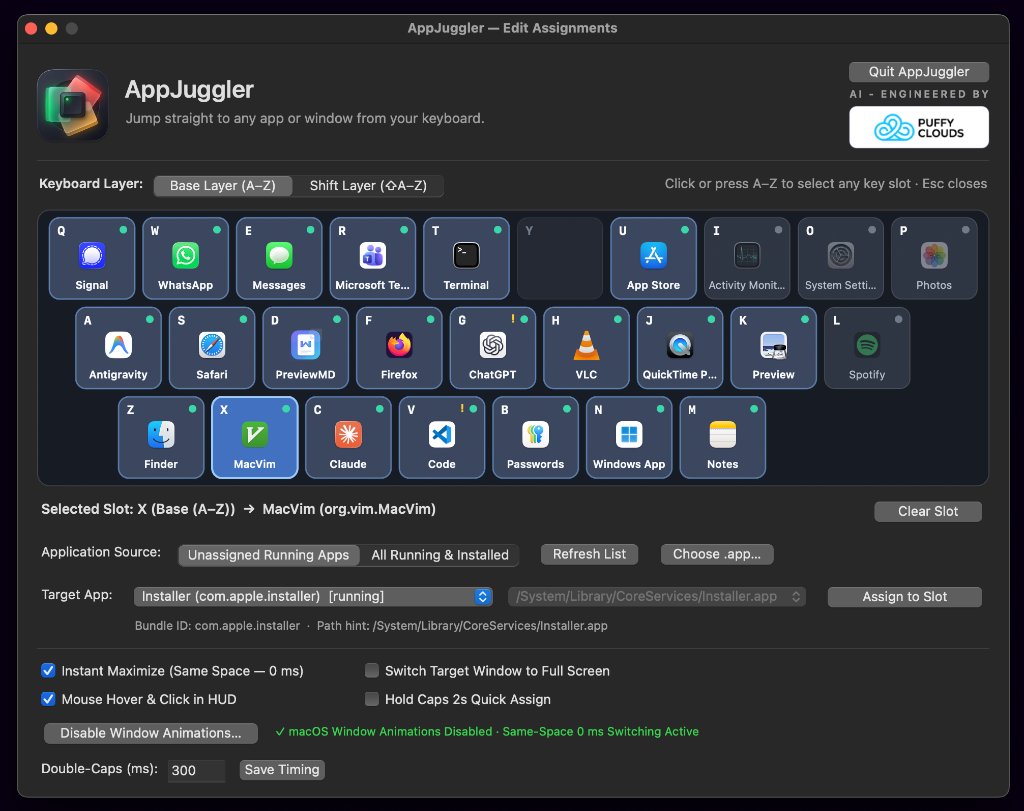
⇪⇪ , opens Edit Assignments: click a key, pick a running or installed app, assign.
09
Native and tiny.
A ~4 MB native Swift app. Starts instantly, launches at login, nothing else to install.
10
Keyboard-first, mouse-optional.
Hover, click and scroll in the overlay are there if you want them.
Your keystrokes stay yours.
- AppJuggler only watches for the Caps Lock double-tap. Normal typing passes straight through.
- It never records what you type.
- The app has no analytics, no tracking and no account.
- License check: your key is activated once with our payment partner Polar (sending the key, your Mac's model and an anonymous device ID) and re-checked at most once a week. It works offline in between.
- Once a day the app fetches a small update file from dl.puffyclouds.works, with no identifiers.
- Nothing about your apps, windows or keystrokes is ever sent.
- Built by an independent developer in the EU (Poland).
Pricing
Pay once. Juggle forever.
AppJuggler 2 — Personal license
€19one-time
incl. VAT where applicable; final price shown at checkout
- Up to 3 of your own Macs
- All 2.x updates included
- 14-day free trial, no card
- 30-day money-back guarantee
- VAT and invoice handled at checkout
AppJuggler 2.0 is coming soon. Write to hello@puffyclouds.works to get notified.
Prices in EUR; your local price and taxes are shown at checkout. Orders are processed by Polar, our Merchant of Record, which handles payment, VAT and invoices and emails your license key. Lost your license?
FAQ
Questions, answered.
Stop hunting for windows.
AppJuggler 2.0 is coming soon. Write to hello@puffyclouds.works to get notified.
14-day free trial · no card · no account